Wavy Ribbon Procreate Brush Set: A Review for Digital Artists and Designers
What Is the Wavy Ribbon Procreate Brush Set?
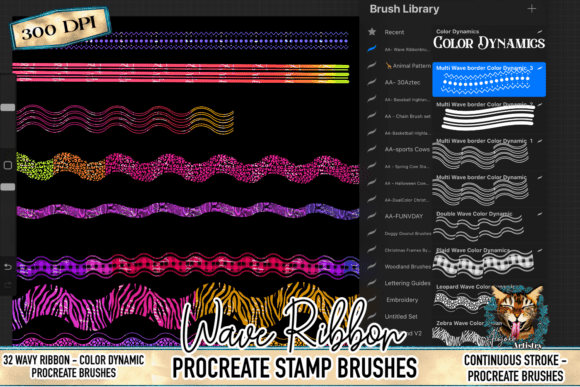
The Wavy Ribbon Procreate Brush Set is a digital brush collection designed specifically for use in the Procreate app. It includes 32 custom brushes that blend flowing ribbon-like lines with textured animal patterns such as snakeskin, cowhide, leopard, and zebra. These brushes are intended to help digital artists create dynamic, expressive designs with minimal effort, particularly for projects requiring stylized movement and texture.
Each brush in the set is crafted to produce continuous, wavy strokes that maintain their clarity and sharpness at high resolutions. They are optimized for Procreate 5X and later versions, making them a specialized tool for iPad-based digital creators.
Why Might You Be Interested in This Brush Set?
Artists and designers working in digital illustration, surface pattern design, or branding may find the Wavy Ribbon Procreate Brush Set appealing for several reasons. The combination of fluid line work and bold animal textures offers a unique visual style that can be difficult to replicate manually or with generic brushes.
If your work involves creating social media graphics, printable art, sticker designs, or textile mockups, these brushes can help streamline your workflow. They allow you to produce polished, textured lines without the need for layering multiple effects or manually drawing intricate patterns.
Key Benefits of Using the Wavy Ribbon Procreate Brush Set
- Effortless Texture and Motion: Each brush integrates texture and curvature, enabling artists to create complex visual effects with a single stroke.
- High-Resolution Output: Designed for sharp results, these brushes are suitable for both digital and print applications, including professional-grade artwork.
- Versatile Animal Patterns: With snakeskin, leopard, zebra, and cowhide options, the set provides a variety of stylized textures suitable for both edgy and elegant designs.
- Easy Installation: Delivered as a single .brushset file, the set is simple to install and manage within Procreate, with clear setup instructions included.
Tradeoffs and Considerations
While the Wavy Ribbon Procreate Brush Set offers several compelling features, it's important to understand its limitations and how it compares to alternative tools. First, the set is exclusive to Procreate and will not work in Adobe Photoshop, Illustrator, or other design software. This may be a drawback for designers who work across multiple platforms.
Additionally, while the brushes are designed for ease of use, they may not offer full customization for advanced users who prefer to tweak brush dynamics extensively. The pre-set textures and line styles are optimized for specific aesthetic outcomes, which may limit flexibility in certain creative contexts.
When Is This Brush Set a Strong Fit?
This brush set is particularly well-suited for:
- Surface Pattern Designers: Those creating fabric prints, wrapping paper, or repeat patterns can benefit from the flowing, textured lines these brushes produce.
- Social Media Content Creators: Artists designing Instagram posts, Pinterest graphics, or TikTok thumbnails can use these brushes to add visual flair quickly.
- Illustrators with a Style Focus: Designers aiming for a bold, textured look—especially in animal-inspired work—will find these brushes effective for generating consistent, high-quality strokes.
- Beginners and Intermediate Procreate Users: Those who may not yet have the skill or time to create custom brushes from scratch can leverage this set to enhance their work efficiently.
When Might Alternatives Be Worth Considering?
If your design needs are highly specialized or span multiple software platforms, you may want to explore other options. For example, if you primarily use Adobe Creative Cloud applications, a brush set compatible with Photoshop would be more appropriate.
Additionally, advanced Procreate users who frequently adjust brush settings like grain, scattering, or pressure dynamics may find the pre-configured nature of these brushes limiting. In such cases, building or purchasing customizable brush sets might offer more control.
For those seeking a broader range of textures or line styles beyond animal patterns, there are more general-purpose brush sets available that include floral, geometric, or abstract designs.
Setting Realistic Expectations
The Wavy Ribbon Procreate Brush Set is not a one-size-fits-all solution but rather a specialized tool for specific design aesthetics and workflows. Users should evaluate whether the included textures and line styles align with their creative goals before purchasing.
It’s also important to ensure your device meets the compatibility requirements—specifically, an iPad running Procreate 5X or later. Older versions of the app may not support the brush dynamics used in this set.
Practical Decision-Making Insights
Before deciding whether to invest in the Wavy Ribbon Procreate Brush Set, consider the following questions:
- Do you work primarily in Procreate? If yes, this set could be a valuable addition. If not, explore brushes compatible with your main design software.
- Is your style aligned with flowing lines and animal textures? If you frequently incorporate curves and bold patterns into your work, this set will likely enhance your process.
- Are you looking for ease of use? If you want to create detailed effects quickly without complex layering, these brushes can save time.
- Do you need full brush customization? If you prefer adjusting every brush parameter to suit your workflow, you may want a more flexible or modular brush set.
Final Thoughts
The Wavy Ribbon Procreate Brush Set offers a focused and effective solution for digital artists who want to incorporate flowing, textured lines into their work. It excels in environments where speed, visual impact, and stylistic consistency are important. However, it’s best suited for users who work within Procreate and appreciate the specific aesthetic of wavy lines combined with animal patterns.
As with any creative tool, the best way to determine its value is by testing it in your own workflow. If the textures and line styles resonate with your artistic or design goals, this brush set could become a go-to resource in your toolkit.