Garden Bounty Procreate Stamp: A Creative Tool for Nature-Inspired Digital Art
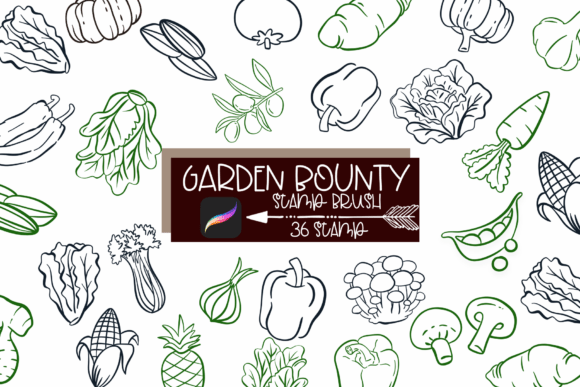
If you're an artist, designer, or creative entrepreneur looking to infuse your digital illustrations with the charm of organic farm life, the Garden Bounty Procreate Stamp might just be the tool you've been missing. This set of 36 hand-drawn line art brushes brings a wide variety of vegetables, fruits, and herbs directly into your Procreate app, making it easy to create authentic, nature-inspired visuals for everything from recipe books to eco-friendly packaging.
What Makes Garden Bounty Procreate Stamp Unique?
Unlike generic clipart or vector graphics, each brush in the Garden Bounty Procreate Stamp Brush Set is designed with a natural, hand-drawn aesthetic. This gives your artwork a personal, artisanal feel that's hard to replicate with standard digital tools. Whether you're designing a farmers market poster, a food blog graphic, or a line of organic product labels, these stamps offer flexibility and visual appeal.
They’re especially useful for creators who may not have advanced illustration skills but still want to produce professional-looking work. Just tap a brush, and you instantly add a crisp, charming image of a carrot, tomato, or sprig of rosemary to your canvas.
Common Mistakes and Misconceptions
While the Garden Bounty Procreate Stamp is a powerful tool, there are some common missteps users often make when first working with it. Recognizing and avoiding these can save time, improve the quality of your work, and help you get the most out of the brush set.
1. Assuming All Brushes Are the Same Size
One of the first things many users overlook is that the brushes vary in scale and detail. For example, a mushroom might appear much smaller than a pumpkin when stamped at default size. This can lead to inconsistent visuals if you're not adjusting each stamp to fit your composition.
Better approach: Zoom in or out before stamping to adjust the relative size. You can also create a reference guide of each brush at a standard scale to ensure consistency across your design.
2. Using Too Many Stamps in One Composition
It's tempting to use as many elements as possible, especially when you have a full set of 36. But overcrowding your canvas with vegetables, fruits, and herbs can make your design feel cluttered and amateur.
Better approach: Curate your elements based on theme and purpose. If you're designing a menu, focus on relevant items like tomatoes, herbs, and citrus. If you're creating a children’s book illustration, maybe focus on bright, bold items like pumpkins and peppers.
3. Ignoring the Line Weight and Style
Each stamp has a unique line style—some are delicate and detailed, others are bold and chunky. Mixing these without consideration can lead to a disjointed look.
Better approach: Stick to a consistent line style across your illustration, or group similar styles together. You can also adjust pressure settings in Procreate to subtly vary the weight of lines after stamping.
4. Not Checking Compatibility Before Purchase
Some users assume that all Procreate brushes will work seamlessly on their device. However, not all brushes are optimized for every version of the app or iPad model.
Better approach: Before purchasing, check the product description to confirm compatibility with your device and Procreate version. Many sellers offer preview files or demo brushes—take advantage of those to test performance before buying.
What to Look for Before You Buy
The Garden Bounty Procreate Stamp Brush Set offers a lot, but it’s not the only option on the market. Here are a few key points to consider before making a purchase:
- Brush variety: Does the set include the types of produce you actually need? Some sets focus more on exotic fruits, others on common garden vegetables.
- Customizability: Can you adjust the size, opacity, and texture of each stamp? This affects how versatile the brush set will be in different projects.
- Support and updates: Is the creator active and responsive to questions or updates? Brush sets sometimes need adjustments for new Procreate versions.
- File format: Make sure the download is in a format you can easily import into Procreate (typically .brush or .brushset).
Maximizing the Value of Garden Bounty Procreate Stamp
Once you’ve downloaded and installed the brushes, there are several ways to make the most of them:
- Use layers strategically: Stamp each element on a separate layer so you can edit or move them independently without affecting the rest of your design.
- Combine with other tools: Don’t rely solely on stamps. Use Procreate’s drawing brushes to add shading, backgrounds, or custom text to enhance your stamped elements.
- Create reusable templates: If you frequently design menus or recipe cards, build templates with pre-placed stamps to save time on future projects.
Real-World Uses for Garden Bounty Procreate Stamp
This brush set is ideal for a wide range of creative professionals and hobbyists. Here are just a few examples:
- Bloggers: Enhance food or gardening posts with charming illustrations.
- Small business owners: Design custom packaging, labels, or promotional materials for organic products.
- Educators: Create engaging visuals for lesson plans about nutrition, farming, or sustainability.
- Merchandise designers: Use stamps to create T-shirt prints, stickers, or greeting cards with a natural theme.
Final Thoughts
The Garden Bounty Procreate Stamp is more than just a set of digital brushes—it's a versatile tool that can elevate your creative output with minimal effort. Whether you're a beginner looking to add visual interest to your designs or a professional aiming for a handcrafted touch, this brush set offers a practical and charming solution.
By avoiding common pitfalls like mismatched sizing, overuse of elements, and compatibility issues, you’ll ensure that your experience with the Garden Bounty Procreate Stamp Brush Set is both enjoyable and productive. With a little planning and attention to detail, you can bring your garden—and your designs—to life in a way that feels fresh, authentic, and uniquely yours.