5 Procreate Brushes – Rajut Sulam: Elevate Your Digital Art with Embroidery Style
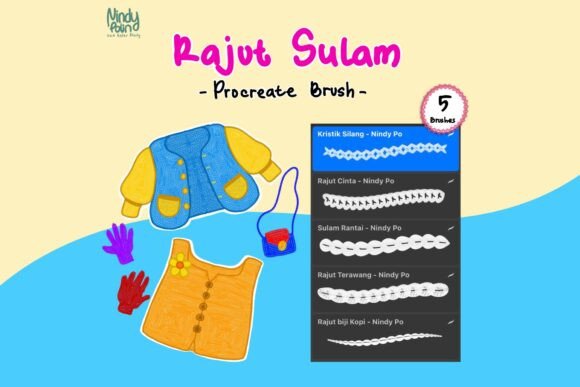
Are you looking to add a unique, handcrafted touch to your digital illustrations? The Procreate Brush - Rajut Sulam might be exactly what you need. This set of five custom brushes, created by Nindy Po, mimics the intricate textures of traditional embroidery and knitting, giving your artwork a charming, tactile quality that stands out.
Let’s dive into what makes these brushes special, how they can enhance your creative process, and why they’re a must-have for digital artists who appreciate delicate, ornamental styles.
What Is Rajut Sulam?
The term Rajut Sulam comes from Indonesian, where “Rajut” means knitting and “Sulam” means embroidery. These are traditional textile arts that involve creating detailed, decorative patterns using thread. The Procreate Brush - Rajut Sulam translates that aesthetic into digital form, allowing you to simulate the look of stitched and knitted textures without needing a needle or fabric.
Whether you're illustrating greeting cards, designing social media graphics, or creating personal art pieces, these brushes bring a warm, handmade feel to your work. They're especially popular among artists who want to blend modern digital tools with nostalgic, craft-inspired visuals.
Inside the 5 Procreate Brushes – Rajut Sulam
This brush pack includes five distinct brushes, each designed to replicate a different embroidery or knitting technique. Let’s explore each one and how you can use them in your artwork:
- Thread Stitch Brush – Mimics the appearance of fine, hand-sewn stitches. Perfect for outlining or adding delicate texture to shapes.
- Knotting Brush – Simulates the look of knotted embroidery threads. Great for creating organic, textured fills or adding depth to backgrounds.
- Cross Stitch Brush – Designed to replicate the grid-like patterns of cross-stitch embroidery. Ideal for pixel-style art with a soft, textile twist.
- Chain Stitch Brush – Offers a flowing, interconnected stitch pattern that's perfect for borders, floral elements, or dynamic linework.
- Fabric Weave Brush – Adds a subtle woven texture that mimics cloth, making it ideal for overlays, shading, or background treatments.
Each brush comes in a single .brush file, making it easy to install and start experimenting right away. You can layer them, adjust pressure settings, or blend them with other brushes to achieve the exact look you're going for.
Why Artists Love the Rajut Sulam Brushes
These brushes have gained popularity for a few key reasons:
- Unique Aesthetic – The embroidery-inspired textures are rare in digital art tools, offering a fresh alternative to standard brushes.
- Versatility – They work across a variety of projects, from character design to pattern making and even UI elements.
- Customization – Since they're built for Procreate, you can tweak settings like opacity, grain, and pressure sensitivity to match your style.
- Fast Workflow – You don’t need to manually recreate embroidery effects with layer styles or filters. These brushes do the heavy lifting.
Artists who enjoy a whimsical, handcrafted look—especially those creating for print-on-demand, social media content, or personal branding—find these brushes incredibly useful. They add a sense of warmth and authenticity that resonates with audiences.
How to Use Rajut Sulam Brushes in Your Projects
Here are a few practical scenarios where the Procreate Brush - Rajut Sulam can make a big difference:
1. Illustrating Greeting Cards or Stationery
Use the cross stitch and chain stitch brushes to create patterns and borders that mimic real embroidery. It’s a great way to give your digital cards a handmade feel that customers love.
2. Designing Social Media Graphics
Adding a subtle fabric weave or knotting brush as a background texture can elevate your Instagram posts or Pinterest graphics. It gives your content a cohesive, boutique-style aesthetic.
3. Creating Character Art with Textured Clothing
If you draw characters wearing knitted sweaters or embroidered dresses, the knotting and thread stitch brushes can help you replicate fabric texture without needing complex layer effects.
4. Making Pattern Overlays
Combine the chain stitch and knotting brushes to create seamless patterns that can be exported and reused in other design software like Photoshop or Illustrator.
Who Should Use These Brushes?
The Procreate Brush - Rajut Sulam is ideal for:
- Digital illustrators who want to explore textile-inspired art
- Surface pattern designers looking for organic textures
- Print-on-demand creators who sell embroidered-style artwork
- Beginner artists wanting to experiment with brush textures
- Anyone who appreciates the warmth of handmade crafts in digital form
If you're someone who enjoys blending traditional art techniques with modern digital tools, this brush set is worth exploring. It adds a layer of depth and personality that's hard to replicate with standard brushes.
Installation and Setup Tips
Getting started with the Rajut Sulam brushes is simple:
- Download the .brush file from the creator or marketplace.
- Open Procreate and navigate to the Brushes panel.
- Tap the "+" icon and choose "Import Brush."
- Select the downloaded file and confirm the import.
Once imported, you’ll find the brushes in your brush library under the imported set. You can rename the folder, organize it with other brush sets, or even customize individual brush settings to better suit your workflow.
Tip: Experiment with blending modes and layer opacity to enhance the stitched effect. Try layering a chain stitch brush over a base color with a soft multiply blend mode for a more realistic embroidery look.
Final Thoughts
The Procreate Brush - Rajut Sulam brings a rare and beautiful texture to digital art—one that feels both nostalgic and modern. Whether you're designing for print, creating character illustrations, or just experimenting with new styles, these brushes offer a fresh way to express creativity.
If you're looking to stand out in the world of digital illustration, adding a touch of embroidery flair can make all the difference. With five unique brushes in one pack, the Rajut Sulam set is a versatile, easy-to-use tool that every Procreate artist should try.